Basics of Database Mirroring? Step by Step for Configuring Database Mirroring in SQL Server
- What versions of SQL Server is database mirroring available in?
- SQL Server 2005, 2008, 2008R2, and 2012
- What editions of SQL Server is high safety (synchronous) available in?
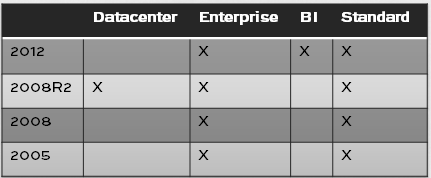
(Synchronous mirroring by SQL Server edition)
- What editions of SQL Server is high performance (asynchronous) available in?
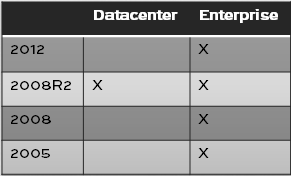
(Asynchronous mirroring by SQL Server edition)
- Do the principal and the mirror need to be on the same version?
- You can have the principal be one version – say 2008R2 – and the
mirror another – say 2012. This is how an upgrade with minimal downtime
can be accomplished using mirroring! However, once you fail over to the
mirror, you can no longer fail back.
- Do the principal and the mirror need to be on the same edition?
- To be fully supported by Microsoft, yes.
- Can multiple databases on the same instance be in mirroring sessions?
- Yes, but there are limitations, based on the hardware of your servers.
- How do I mirror the system database (master, model, msdb, tempdb)?
- You can’t! This isn’t supported.
- If I set up mirroring, do I still have to take full, differential, or transaction log backups?
- Yes! Mirroring increases the availability of your databases. It is not a substitute for regular backups, however.
- How does index maintenance (rebuilds) affect the mirror?
- Transactions that fill up the log can affect the performance of
mirroring. When the amount of information in the log increases, the
amount of information that needs to be sent to and committed to the
mirror increases also. If performance is crucial, you may want to do
index maintenance more frequently, so it takes less time. If large
transactions such as batch inserts are affecting performance, break
those into smaller transactions.
Step by Step Demo:
I am going to outline my environment and then walk through the
process of setting up Database Mirroring. This will include the
configurations, backups, restores and verification process. Let's jump
in.
My test environment consists of two separate VM's running
VM Workstation with Windows 2008 R2 Datacenter Edition and SQL Server
2008 R2 Enterprise named appropriately Principal and Mirror. The SQL
Server and SQL Server Agent Services accounts are running as domain
users (DOMAIN\User). Windows Firewall is OFF for the sake of this
example.
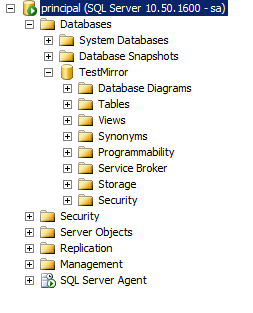
I created a database on the Principal SQL Server instance and named it TestMirror. The recovery model is set to FULL RECOVERY.
1st step: Issue a full backup of the database
.
BACKUP DATABASE TestMirror TO DISK = 'C:\Program Files\Microsoft SQL
Server\MSSQL10_50.MSSQLSERVER\MSSQL\Backup\Backup.bak';
2nd step: Issue a transaction log backup of the database.
BACKUP LOG TestMirror TO DISK = 'C:\Program Files\Microsoft SQL
Server\MSSQL10_50.MSSQLSERVER\MSSQL\Backup\Backup.trn';
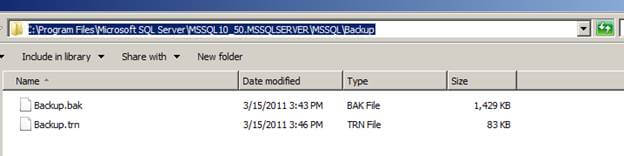
Below are the two files in the file system:
3rd step: Assuming you have the backup folder shared on the Principal
Server and you can access it from the Mirror Server, you will need to
restore the full backup to the Mirror server with the NORECOVERY option.
RESTORE DATABASE TestMirror FROM DISK = N'\\Principal\Backup\Backup.bak'
WITH FILE = 1, MOVE N'TestMirror_log' TO
N'C:\Program Files\Microsoft SQL Server\MSSQL10_50.MSSQLSERVER\MSSQL\DATA\TestMirror_1.ldf',
NORECOVERY, NOUNLOAD, STATS = 10;
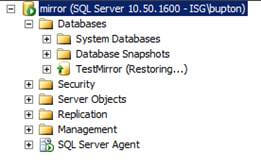
4th step: Restore log backup also with the NORECOVERY option
.
RESTORE LOG TestMirror FROM DISK = N'\\Principal\Backup\Backup.trn'
WITH  FILE = 1, NORECOVERY, NOUNLOAD, STATS = 10;
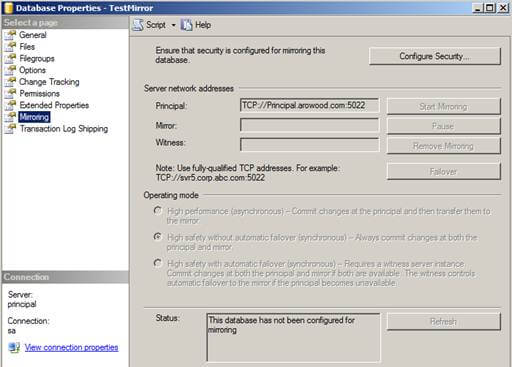
Now it's time to dig down and configure Database Mirroring. From the
Principal server, right click the database and choose "Tasks" | "Mirror"
or choose "Properties" | "Mirroring".
Click the "Configure Security" button and click "Next >" if the
Configure Database Mirroring Security Wizard intro screen appears. The
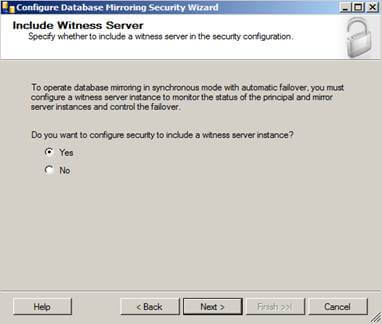
next screen should be the Include Witness Server screen:
This is where you would configure a witness server for your
mirroring, but since we're just configuring a basic mirror we will skip
this part. However, if you are configuring mirroring in an Enterprise
environment it is recommended you configure a witness server because
without one you will not have synchronous automatic failover option.
Select "No", then click "Next >" to continue the process.
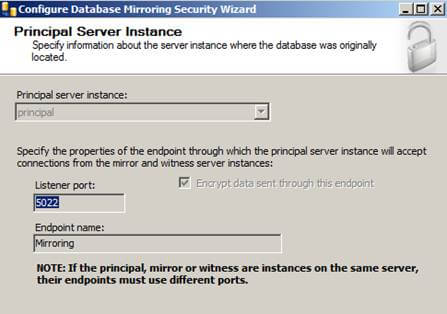
The next screen will give you options to configure the Principal Server Instance:
Here we will be creating our endpoint, which is a SQL Server object
that allows SQL Server to communicate over the network. We will name it
Mirroring with a Listener Port of 5022.
Click the "Next >" button to continue.
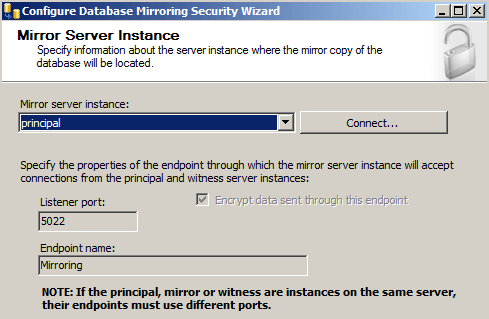
The next screen will give you options to configure the Mirror Server Instance:
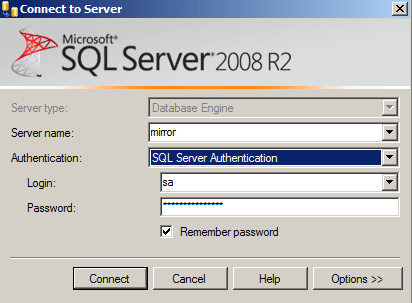
To connect to the Mirror server instance we will need to click the
"Connect..." button then select the mirror server and provide the
correct credentials:
Once connected, we also notice our endpoint name is Mirroring and we are listening on port 5022.
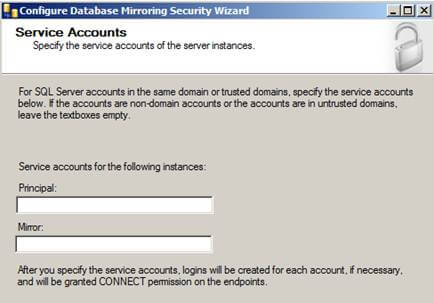
Click "Next >" and you'll see the Service Accounts screen.
When using Windows Authentication, if the server instances use
different accounts, specify the service accounts for SQL Server. These
service accounts must all be domain accounts (in the same or trusted
domains).
If all the server instances use the same domain account or use certificate-based authentication, leave the fields blank.
Since my service accounts are using the same domain account, I'll leave this blank.
Click "Finish" and you'll see a Complete the Wizard screen that
summarizes what we just configured. Click "Finish" one more time.
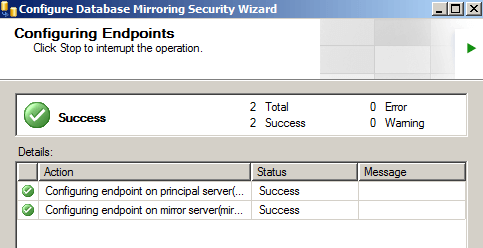
If you see the big green check mark that means Database Mirroring has
been configured correctly. However, just because it is configured
correctly doesn't mean that database mirroring is going to start...
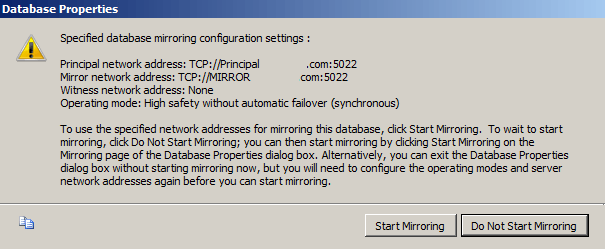
Next screen that pops up should be the Start/Do Not Start Mirroring screen:
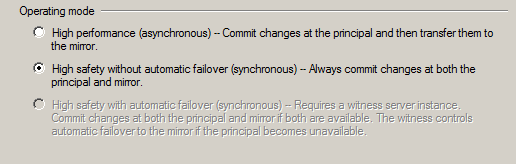
We're going to click Do Not Start Mirroring just so we can look at the Operating Modes we can use:
Since we didn't specify a witness server we will not get the High
Safety with automatic failover option, but we still get the High
Performance and High Safety without automatic failover options.
For this example, we'll stick with synchronous high safety without
automatic failover so changes on both servers will be synchronized.
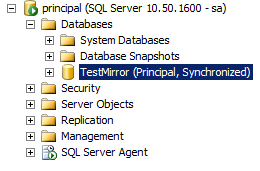
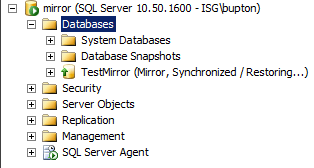
Next, click "Start Mirroring" as shown below.
If everything turned out right, Database Mirroring has been started successfully and we are fully synchronized.
If Database mirroring did not start successfully or you received an error here are a few scripts to troubleshoot the situation:
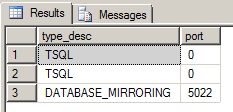
Both servers should be listening on the same port. To verify this, run the following command:
SELECT type_desc, port
FROM sys.tcp_endpoints;
We are listening on port 5022. This should be the same on the Principal and Mirror servers:
Database mirroring should be started on both servers. To verify this, run the following command:
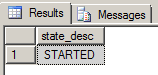
SELECT state_desc
FROM sys.database_mirroring_endpoints;
The state_desc column on both the Principal and Mirror server should be started:
To start an Endpoint, run the following:
ALTER ENDPOINT <Endpoint Name>
STATE = STARTED
AS TCP (LISTENER_PORT = <port number>)
FOR database_mirroring (ROLE = ALL);
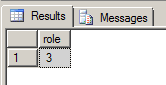
ROLES should be the same on both the Principal and Mirror Server, to verify this run:
SELECT role
FROM sys.database_mirroring_endpoints;
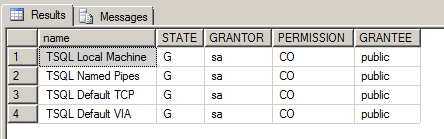
To verify the login from the other server has CONNECT permissions run the following:
SELECT EP.name, SP.STATE,
CONVERT(nvarchar(38), suser_name(SP.grantor_principal_id))
AS GRANTOR,
SP.TYPE AS PERMISSION,
CONVERT(nvarchar(46),suser_name(SP.grantee_principal_id))
AS GRANTEE
FROM sys.server_permissions  SP , sys.endpoints EP
WHERE SP.major_id  = EP.endpoint_id
ORDER BY  Permission,grantor, grantee;
You can see here from the State and Permissions column that the user has been Granted Connect permissions.
Database Mirroring Questions:
1) What is default port of Database Mirroring Endpoint?
Ans : 5022
2) Database Mirroring comes with which edition?
Ans: SQL Server 2005 SP1. Or SQL Server 2005 RTM with trace flag 1400
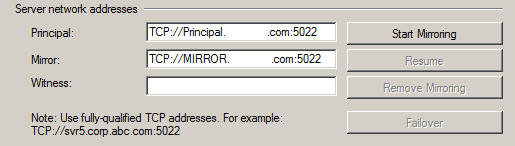
3) When I configure mirroring I’m receiving the below errror,
One or more of the server network addresses lacks a fully qualified
domain name (FQDN). Specify the FQDN for each server, and click start
mirroring again
Ans: The fully qualified computer name of each server can be found running the following from the command prompt:
IPCONFIG /ALL
Concatenate the “Host Name” and “Primary DNS Suffix”
Host Name . . . . . . . . . . . . : A
Primary Dns Suffix . . . . . . . :
corp.mycompany.com
Then FQDN of your computer name is just
A.corp.mycompany.com.
4) How to enable mirroring by Script ?
Ans: – Specify the partner from the mirror server
ALTER DATABASE [AdventureWorks] SET PARTNER = N‘TCP://A.corp.mycompany.com:5022′;
– Specify the partner from the principal server
ALTER DATABASE [AdventureWorks] SET PARTNER = N‘TCP://B.corp.mycompany.com:5022′;
Note: Replace the dbname before using the above script
5) How to disable mirroring by script?
Ans: ALTER DATABASE [AdventureWorks] SET PARTNER OFF
Note: Replace the dbname before using the above script
6) How to do manual failover to Mirror when principle is working fine?
Ans: ALTER DATABASE <DB Name> SET PARTNER FAILOVER
7) Why I’m getting the below error message while configuring database mirroring?
Msg 1416, Level 16, State 31, Line 3. Database is not configured for database mirroring
Ans : You need to restore the Full backup from principal server using
With NoRecovery option and also one transactional log backup from
principal server using With NoRecovery option and then start configuring
mirroring.
8) Can we configure mirroring between Standard Edition & Enterprise Edition or Vice Versa?
Ans: Nope its not possible, both principal and mirror should have same edition
9) Is it possible to take backup of mirrored database in mirror server?
Ans: No
10) Is it possible to perform readonly operation at mirrored database in mirror server?
Ans: Yes, You can create database snapshot for the same
11) Can I create multiple endpoints for configuring different
databases for mirroring and point each database to unique endpoint.
Ans: No
12) Can I configure a single database to be mirrored to more than one
server. i.e) One source & many destination like logshipping
Ans: No
13) How can I increase Heartbeat time between principal and mirror server?? By default its 10 sec.
Ans: ALTER DATABASE AdventureWorks SET PARTNER TIMEOUT 30
Note: Before using the script change the dbname.
14) What status of mirroring has if secondary is down?
Ans: If secondary is down principle or Mirror show status disconnected
15) What status of mirroring has if principle is down?
Ans: If principle is down mirror will be disconnected with in recovery instead of synchronized with restoring
16) What status of mirroring has if mirroring is paused?
Ans: Is mirroring is set to paused from principle then then both principle & mirror in suspending
17) How to bring mirror DB online if Principle is down?
Ans: ALTER DATABASE <DB Name> SET PARTNER FORCE_SERVICE_ALLOW_DATA_LOSS
If you try to do failover like normal situation when principle is
online [ALTER DATABASE <DB Name> SET PARTNER FAILOVER] then you
will receive below error.
ALTER DATABASE <DB Name> SET PARTNER FAILOVER
Msg 1404, Level 16, State 10, Line 1
The command failed because the database mirror is busy. Reissue the command later.
18) System Store Procedure to monitor Mirroring?
Ans:
MSDB.SYS.SP_DBMMONITORRESULTS
19) What are different possible Mirroring Stats?
Ans:
SYNCHRONIZING
SYNCHRONIZED
SUSPENDED
PENDING FAILOVER
DISCONNECTED
20)What is Database Mirroring End Points? Usage of End Points? More info about End Points in DATABASE MIRRORING
Usage of Endpoints:
Endpoints on both the principal, mirror and witness (if being used)
which allows the SQL server instances to communicate with each other.
Database mirroring is a very handy HA(High Availability) solution
available per database for SQL 2005/2008 and is available in both
Enterprise and Standard edition. This solution also provides both
automatic and manual failover. Therefore it is a HA solution available
to almost all SQL server users.
Database mirroring overview is
made up of a principal server role and a mirroring server role plus an
optional witness server. The principal database is available for serving
client and user connections. When transactions are applied to the
principal database these transactions are then submitted to the mirror
servers database, however the mirror server database cannot serve user
requests as the mirror database is left in a recovering state.
The general steps for configuring database mirroring involves the following steps: –
1. Create Endpoints on both the principal, mirror and
witness (if being used) which allows the SQL server instances to
communicate with each other.
2. Create a copy of the principal database on the
mirror server by restoring a backup of the database from the prinicpal
server to the mirror server with the NO RECOVERY option.
3. Start the mirroring session to tell SQL server which endpoints are connected to which partner and witness server.
It seems that the most often overlooked or
misconfigured components are the endpoints. Since all mirroring
information is done over the endpoints it is obviously a critical
component to check if things are not working.
Many people seem to believe that the endpoints are
stored in the principal, mirror and witness databases. Why each
component involved in the mirroring communication requires an endpoint
to actual endpoint configuration is stored in the master database of the
instance. Therefore it is possible to check the configuration on all
nodes in the mirroring configuration.
The following T-SQL code will output information for
the endpoints and if you are having issues with your new mirroring
session you should run this to check the endpoints are configured
correctly on your principal, mirror and witness (if being used).
USE master
GO
SELECT perm.class_desc, perm.permission_name, endpoint_name = e.name, e.state_desc, e.type_desc, t.port, perm.state_desc, grantor = prin1.name, grantee = prin2.name
FROM master.sys.server_permissions perm
 INNER JOIN master.sys.server_principals prin1 ON perm.grantor_principal_id = prin1.principal_id
 INNER JOIN master.sys.server_principals prin2 ON perm.grantee_principal_id = prin2.principal_id
 LEFT JOIN master.sys.endpoints e ON perm.major_id = e.endpoint_id
 LEFT JOIN master.sys.tcp_endpoints t on t.endpoint_id = e.endpoint_id
WHERE perm.class_desc = 'ENDPOINT' AND e.type_desc = 'DATABASE_MIRRORING'
order by endpoint_name ASC
This will provide you with very useful information
such as the endpoint state (started, stopped, etc), TCP port that the
endpoint is using and permissions that have been assigned to the
endpoint along with which user has been granted connect permissions to
the endpoint. You should execute this on each of the mirror instances
such as the principal, mirror and witness.
Obviously with this information you can confirm that
the SQL servers can communicate over the TCP ports. You can confirm this
via telnet <servername> <PORTNUMBER>. If there is a firewall issue, etc this simple check and test will let you know.
You should also pay particular attention to which
grantee has been assigned connect permissions to which endpoint. Your
designated user from the principal instance needs connect permissions on
the endpoint in the mirror instance and the mirror instance user
requires connect permissions to the endpoint on the principal instance.
Ref:
https://www.mssqltips.com/sqlservertip/2464/configure-sql-server-database-mirroring-using-ssms/